-
AsciiNotes26posted in General Discussion • read more
Disclosure: these are project-associated notes from ASCII Art Generator, prepared with AI assistance. They are not an independent review, a camera test or a report of a measured privacy result. The desk scene described here is hypothetical. No live-camera integration or automatic connection to a meeting application is claimed.
A character picture changes representation, not permission
A webcam frame can be a useful starting point for a presentation graphic, but it carries more context than the main subject. A reflection might show a person outside the center of the picture. A notebook can contain a name. A window can reveal a recognizable location. Converting the frame into characters changes how those details look; it does not establish that sharing them is appropriate. Before choosing an effect, decide whether you are entitled to use the source and whether the picture is necessary for the intended message.
For a low-stakes design exercise, an empty desk or an original object drawing is easier to reason about than a recording of another person. A simple scene might contain a closed notebook, a mug and a lamp against a plain wall. Those objects offer different outlines without requiring a face or a real conversation. Even then, inspect labels and background details. A neutral-looking scene is not automatically free of identifying information, and a visual treatment is not a substitute for reviewing the source.
Give the picture one modest job
Imagine that the picture will be a divider slide in a short presentation about making a workspace easier to recognize. The graphic does not need to document an actual call. It only needs to suggest a desk. That purpose changes the decisions: the notebook's outline might matter more than the small lettering on its cover, and the lamp's shape might matter more than the texture of the wall. A conversion becomes easier to judge when there is a clear sentence describing what the picture needs to communicate.
Keep essential labels outside the decorative effect. A title, speaker name or date should remain ordinary readable text if people need it. Do not make the audience reconstruct event information from a dense character pattern. A plain version of the slide can be useful as well. If the graphic turns out to be distracting or the destination handles the image poorly, removing the decoration should not remove the information that the presentation was supposed to convey.
A grid is a budget for visible features
Reducing an image to cells asks which features deserve the available space. A wider grid provides more room, but it also creates an output that someone must display. A small crop can preserve the shape of a mug more effectively than a large grid that includes an entire room. Start by choosing the area that matters. Then compare a small number of settings while keeping the crop fixed, rather than changing the source, density, colors and destination at the same time.
Characters add their own shapes. A dot, slash, hash mark and letter do not occupy a cell in the same way. Their apparent weight depends on the font and background as well as the symbol. A preview can therefore be recognizable for reasons that are not preserved when the same text is pasted elsewhere. Treat the first result as a draft. Ask whether the important outline remains clear at the actual viewing size, not merely whether the conversion has produced a lot of detail.
The ascii maker provides a place to explore character pictures and related visual tools. Its basic converters are free, while optional AI features are paid. It is a web tool for preparing outputs, not a claim that your live webcam is being processed or that a meeting application supports a particular effect. For this desk illustration, the useful question is whether a chosen output communicates the intended shape. It is not whether the tool has made the source safe to publish.
Copied text and exported pictures need different checks
Copied character text depends on its destination. A narrow chat window can wrap a line that looked tidy in an editor. Repeated spaces can collapse, and a proportional font can change the width of the arrangement. Where a platform offers a preformatted text area, test the result there. Do not assume that pasting into a normal paragraph preserves a grid. If a layout only works after someone manually reconstructs its spacing, consider whether a simpler version would serve the purpose better.
An image output preserves a different kind of arrangement. The composition can remain fixed while the whole picture is scaled down, which can make small details disappear. Inspect it at the size people will actually see. A transparent background also needs a context: dark characters can disappear against a dark page, while pale characters can disappear against a light one. Choose a suitable background or a predictable fixed presentation instead of treating transparency as an automatic improvement.
Stylization is not an anonymity guarantee
A recognizable outline, a distinctive object or an accompanying caption can reveal information even when fine details are no longer obvious. A person's identity might also be supplied by the surrounding conversation. Do not describe a character conversion as a privacy filter, a secure redaction process or a promise that recognition is impossible. If the source contains information that should not be shared, the safer design decision may be to use a different source rather than trying to disguise the original one.
The same principle applies to fictional examples. A synthetic or hand-drawn desk should be labeled as an illustration, not presented as evidence of someone's real workspace. Do not add a person's name, a company mark or a testimonial just to make a mockup seem more convincing. The picture can be useful without claiming to document a real event. Keeping that distinction explicit makes it easier for a recipient to understand what the graphic does and does not establish.
Respect the shape of a character cell
A text cell is not necessarily a square. Its width and line height can change a round object into an apparently stretched outline, even if the source picture has not changed. That matters when someone compares an editor preview with copied text in another program. Check a simple familiar shape rather than judging only a complicated scene. If the shape becomes noticeably taller or wider, investigate the font and spacing assumptions before deciding that the source needs more detail.
For a slide illustration, leave room around the composition instead of stretching it to fill every available corner. A fixed picture can be scaled while preserving its proportions, but its small marks can still become hard to distinguish. A copied grid can have the additional problem of wrapping. These are different presentation issues. Keeping them separate helps you choose an appropriate adjustment instead of repeatedly changing unrelated conversion settings.
Keep the handoff understandable
A small handoff note can save more work than another round of effects. Keep the authorized source, the selected output and a short explanation of the intended destination. Record whether the result is copied text or an image, and name the background and font assumptions that matter. Someone placing the graphic in a different layout should not have to guess which version was approved or whether changing the background will make the characters hard to see.
Finally, review the whole communication rather than only the picture. Is the essential text still clear without the effect? Does a caption imply a person, place or test that is not real? Does the output still fit its destination without unexpected wrapping or a loss of contrast? A character-based illustration can be an interesting design choice, but ordinary typography or a simpler drawing may work better. The goal is a useful, honestly described graphic, not the largest possible collection of conversion settings.
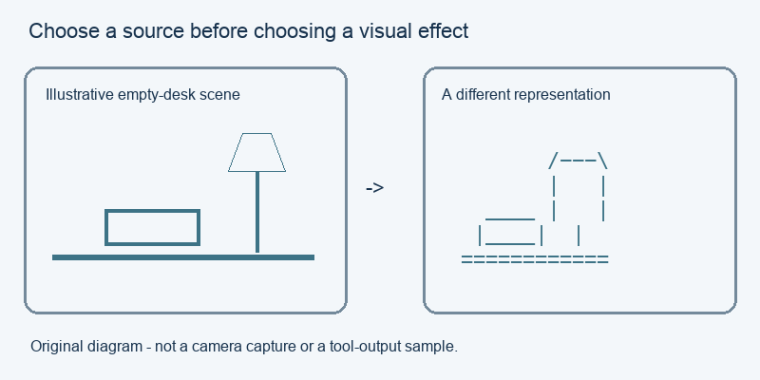
Original explanatory illustration, not a webcam capture or an actual conversion result.